



Disclaimer: This article is for informational purposes only. Always research and verify software features, pricing, and suitability for your business before making decisions.
You didn’t start a contracting business to spend your evenings hunting for lost work orders. But here you are.
When you run a lean team with two techs, maybe 5 hours of admin time is an hour you’re not billing. In fact, field service workers report that 18% of their working hours are wasted on low‑value tasks like paperwork, tracking, and coordination. The wrong software makes that worse. The right one gives you your evenings back.
Most work order management roundups push the same enterprise names that charge per user, require 3-month onboarding, and come with a dedicated account manager you’ll never actually talk to. That’s not what you need.
Here’s a more honest list: 7 tools actually built for contractors who run lean, move fast, and don’t have an IT department on speed dial.
Have questions about this story?
Ask Tundra for more details, context, or updates.
What Does Good Work Order Software Mean When You Run a Small Crew
Let’s face it: enterprise CMMS tools were built for facilities managers overseeing 400-unit apartment complexes, not a three-truck HVAC operation in the suburbs.
When you’re running lean, here’s what actually matters:
- Fast setup: If it takes three weeks to configure, you’ll never finish. You need to be dispatched in under a day.
- Mobile-first for your techs: Your technicians are not sitting at desks. The app needs to work on a phone, in a parking lot, with sweaty gloves.
- QuickBooks integration: Non-negotiable. Re-entering invoices manually is a tax on your time and sanity.
- Flat or simple pricing: Per-user costs explode fast when your crew grows by two people mid-season.
- No dedicated onboarding team required: You don’t have time for 6 Zoom calls before you can create your first work order.
Keep these in mind as you review the list. One more thing worth reading before you decide: understanding how digital work orders connect scheduling, dispatch, and invoicing in one place is half the battle. This breakdown of how job scheduling software works for field service businesses gives you a solid framework for evaluating any tool on this list.
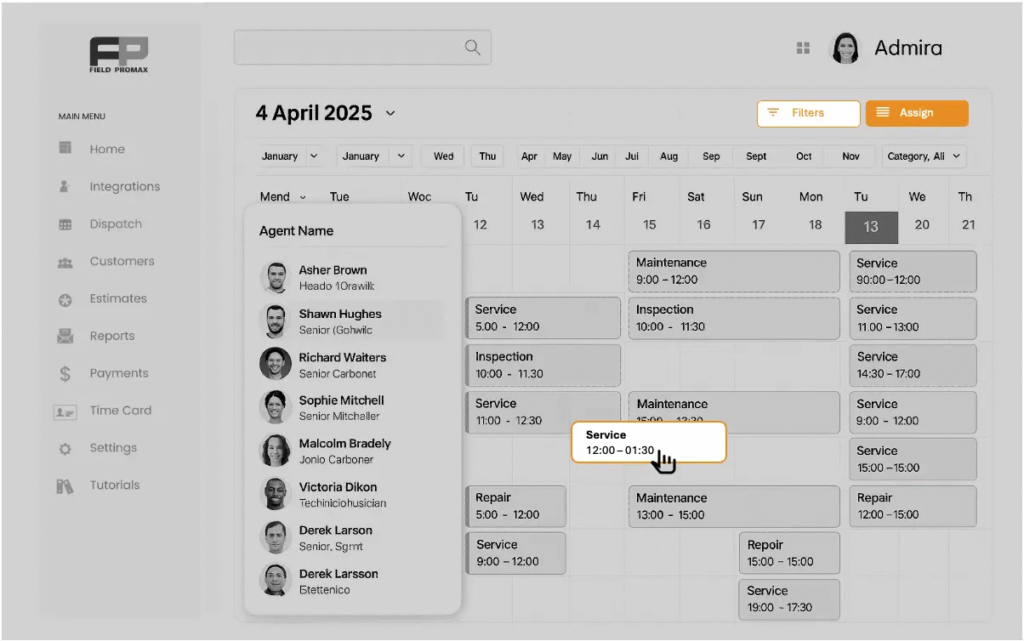
1. Field Promax: Best for Small Field Service Teams Who Want One System
Field Promax is built from the ground up for service contractors with small-to-mid-sized crews. HVAC, plumbing, electrical, cleaning, and property management businesses use it as their single operational hub.
Here’s the thing: it doesn’t try to be everything. It handles scheduling, dispatch, work orders, estimates, invoicing, and QuickBooks sync without drowning you in features you’ll never touch.
Dispatchers get a color-coded drag-and-drop board. Techs get a clean mobile app. When a job is complete, the customer signs on the tablet, and the invoice syncs to QuickBooks instantly. The whole loop closes without anyone driving back to the office.
Tools like Field Promax generate work orders automatically from estimates, so you’re not rebuilding the same document from scratch every time a recurring customer calls.
Best for: HVAC, plumbing, electrical, and cleaning contractors with 1-25 technicians.
2. Knowify: Best for Trade Contractors Who Need Real Job Costing
Knowify was built specifically for trade contractors: electrical, plumbing, HVAC, painting, and similar businesses. It covers work orders, job costing, estimates, and QuickBooks Online sync, and it actually speaks the language of the trades.
Where it stands out is job costing. You can track labor, materials, and subcontractors against a budget in real time. For contractors who work on projects with tight margins, that visibility is worth its weight in gold.
The workflow is straightforward: create an estimate, convert it to a job, assign it to a tech, track costs as the work happens, and invoice when done. It’s simple and effective.
Best for: Electrical, HVAC, and specialty trade contractors with 10-200 employees who care deeply about job profitability.
3. Orderry: Best for Repair and Service Businesses That Track Equipment
Orderry sits somewhere between field service management and repair shop software. If you service equipment at customer sites and need to track what’s been done to each unit, Orderry is worth a close look.
It handles work orders, scheduling, inventory, and invoicing. You can create digital warehouses for parts, log equipment history per customer, and assign jobs to technicians, all from one platform.
Setup is fast. Techs and managers tend to figure it out without special training, which matters when you’re onboarding a new hire mid-season.
One note: the inventory management feature has some rough edges when parts are out of stock. If your operation depends on tracking heavy parts, run a trial before committing.
Best for: HVAC and appliance repair contractors who need to track equipment history across customer accounts.
4. Simpro: Best for Trade Businesses That Work on Projects and Service Calls
Simpro is a well-established field service management platform built specifically for trades. Electrical, plumbing, HVAC, and similar businesses use it to manage both recurring service calls and longer-term projects.
Its dashboard gives you a live view of job costs, sales targets, and open work orders. Field techs use Simpro Mobile to clock in, access job notes, attach photos, update status, and send invoices all from their phones.
It integrates with QuickBooks and Xero, which handles the accounting side without double-entry headaches.
Fair warning: Simpro is feature-rich. If you’re a 2-person operation, it may feel like more than you need. But for growing trade businesses managing both projects and service agreements, it scales well.
Best for: Trade contractors with growing teams who handle both project-based work and recurring service calls.
5. Workyard: Best for Contractors Who Need Accurate Labor Tracking
The workyard takes a different approach than most tools on this list. It’s primarily a workforce management and GPS tracking platform, with work order features built on top.
Also Read: Why Workforce Management Call Center Solutions Are Essential for Scaling Your Operations
If labor cost is your biggest variable, which it is for most service contractors, Workyard helps you understand where every hour goes. GPS-powered time tracking, precise job cost analysis, and a drag-and-drop dispatch board give you visibility that spreadsheets never could.
You can attach notes, photos, and updates to work orders from the field. Managers get real-time location data and can spot scheduling gaps before they cause problems.
Best for: Contractors where labor hours are complex to track, such as construction, landscaping, or multi-crew field operations.
6. IndusTrack: Best for Plumbing and HVAC Contractors Tired of Patchwork Systems
IndusTrack is a field service management platform aimed squarely at residential and commercial contractors in HVAC and plumbing. It brings scheduling, estimating, work orders, purchase orders, inventory, and invoicing into one system.
Here’s what contractors consistently highlight: the estimate-to-job-to-invoice flow. You build an estimate, convert it to a job with a few clicks, track it through completion, and send the invoice. If your current setup involves three different tools, IndusTrack will feel like a relief.
Pricing starts at $35 per tech per month, which is competitive with enterprise-tier platforms that charge 3-4x more for the same capabilities.
Best for: HVAC and plumbing businesses with 5-50 technicians running on a combination of apps, spreadsheets, and text messages.
7. mHelpDesk: Best for Contractors Who Need Simple Work Order Tracking Fast
mHelpDesk has been around long enough to work out the kinks. It covers work orders, scheduling, dispatch, customer management, and invoicing in a package that doesn’t require a manual to use.
It’s a solid choice if you’re coming from zero, meaning you’re currently running on text chains, paper, or a generic calendar, and you need something operational in a day or two. The onboarding is guided, the interface is intuitive, and the support team responds quickly.
It integrates with QuickBooks and syncs customer records, allowing your office and your field to operate from the same information.
Best for: Small contractors making their first switch from manual or paper-based operations
How to Pick the Right One Without Getting Paralyzed by Options
Don’t try to find the perfect tool. Find the right one for where you are right now. Platforms like sparx reader can help simplify how teams process and understand operational workflows before committing to a system.
Here’s a simple decision framework:
- Under 5 techs, first digital tool: Start with mHelpDesk or FieldPromax. Simple, affordable, and ready to go.
- 5-20 techs, trade contractors: Know if job costing matters most. Simpro if you do project work. Field Promax if you want scheduling, dispatch, and QuickBooks in one.
- Heavy equipment tracking: Orderry or IndusTrack.
- Labor-heavy, multi-crew operations: Workyard.
Whatever you pick, commit to one. The contractors who actually see results aren’t using the “best” tool. They’re using their tool consistently and letting the data stack up over time.
If you want to see what a full-picture view of work orders, scheduling, and invoicing can do for a small crew, this guide on what FSM software can do for small businesses is worth 10 minutes of your time.
What Happens When You Keep Running on Sticky Notes and Text Messages
Let’s be blunt. The cost of not switching isn’t zero.
Contractors using manual processes lose real money to slow invoicing cycles, missed follow-ups, and jobs that fall through the cracks. That number isn’t theoretical; it’s arithmetic.
The better-run shop down the street isn’t necessarily more talented. They just stopped doing things manually. The right tool doesn’t make you work harder. It makes the work you’re already doing visible, trackable, and billable.
If you’re in the trades and want to understand why more businesses in your space are moving fast on this, this look at current plumbing industry trends shows how the professionalization of field service is reshaping expectations across every trade.
The Bottom Line
You don’t need a $400/month enterprise platform to stop losing jobs to disorganization.
Seven solid tools exist today that were built with lean contractor teams in mind. Some are better for job costing. Some shine at equipment tracking. Some just get out of your way and let you dispatch, complete, and invoice without breaking a sweat.
Pick one. Run a trial. See what happens when your work orders don’t lie in a folder on the passenger seat. Even something like Field Promax can completely change how your day flows.
Frequently Asked Questions
What is work order management software for contractors?
Work order management software helps contractors create, assign, track, and close jobs digitally. Instead of paper forms or spreadsheets, everything lives in one place: customer details, job notes, tech assignments, photos, and invoices. The best tools also sync with QuickBooks, so billing doesn’t require re-entering the same information twice.
Which work order tools work best for small HVAC or plumbing teams?
For small HVAC and plumbing teams, look for tools with fast setup, mobile apps for techs, QuickBooks integration, and affordable pricing that doesn’t scale aggressively per user. Field Promax, Knowify, and IndusTrack are all designed with exactly that kind of team in mind.
Do I need work order software if I only have a few technicians?
Yes, lean teams benefit more from digital work orders than larger teams do. When you have fewer people, every dropped job or slow invoice hurts proportionally more. A simple tool like mHelpDesk or Field Promax can pay for itself in the first month just by closing your invoicing cycle faster.
What should work order software integrate with?
QuickBooks integration is the most important for most contractors; it eliminates double-entry between job management and accounting. Beyond that, look for GPS/mapping tools, payment processors (such as Stripe or Square), and any CRM or customer-communication tools your team already uses.