




Disclaimer: This guide is for informational purposes only. App features, pricing, and results may vary. Always review apps and consult experts before making business decisions.
Choosing the right apps isn’t just about adding features it’s about using data to make smarter decisions. Organizations that use analytics to personalize experiences are 23 % more likely to attract new customers and 19 % more likely to retain them, which makes apps for customer insights, product recommendations, and personalized marketing essential for any store looking to grow in 2025. These tools don’t just automate tasks; they help turn casual browsers into loyal buyers.
But here’s something I keep seeing: About 70% of growing shops aren’t using these smart connections properly. They’re missing out on understanding what buyers really want and making quick changes, which could mean leaving 20% of their money on the table.
I put this guide together after checking out the Shopify App Store, reading up on Practical Ecommerce and TechCrunch, and looking at the latest from the CRA on online taxes. It’s got 10 solid apps for 2025, sorted by what they handle from money stuff to customer chats. I’ll compare them, share real-world stories, and give tips based on what I’ve learned. No nonsense, just practical help.
Have questions about this story?
Ask Tundra for more details, context, or updates.
The Big Picture: Why Integrate Your Shopify Store?
Day-to-day e-commerce means juggling orders, checking inventory, and figuring out marketing. Apps that connect to Shopify share data automatically, so you don’t have to copy things over or worry about errors. It frees you up to think bigger, such as adding new products or entering new markets.
From what I’ve seen in Deloitte reports, this can cut operational waste by 25-35%. The main upsides:
- Automate the Grind: Ditch manual tasks like bookkeeping and shipping to reduce mistakes across the board.
- Grow Smart: AI helps spot trends and tailor experiences, grabbing that extra 20% revenue that slips past many stores.
- Keep Costs Down: Start at $15- $ 40 a month, and they scale as your business grows.
For Canadian sellers dealing with taxes, getting expert help from a shopify bookkeeper and tax accountant makes sure everything ties in right.
What’s New in 2026 Integrations
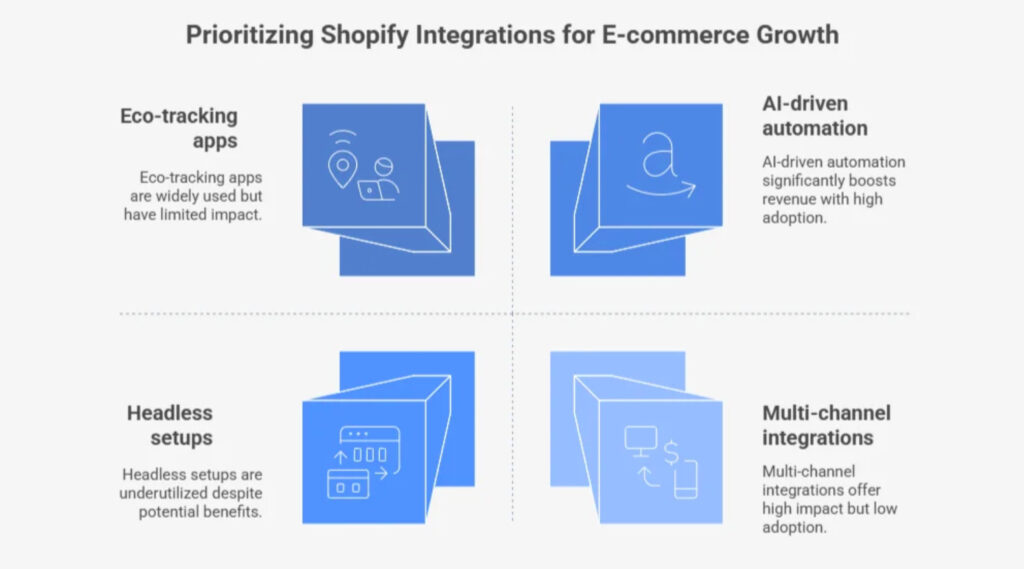
Things are changing fast in e-commerce. AI is now essential, not optional. Headless setups and voice shopping are big, according to Gartner. Shops are going omnichannel by linking to platforms like Pinterest and following Shopify’s tax rules.
Trends to know:
- AI Power: Tools that predict customer drop-offs 35% better, so you keep more people without extra work.
- Green Focus: Apps that track your eco-footprint, helping with Canadian tax breaks for sustainable stuff.
- Speed Up: Faster sites mean 12-18% more sales for big inventories.
Tip: Review your apps yearly and swap in AI ones. For overseas, pick GDPR-friendly options. Spend 8-12% of your ad budget here; it pays back 2.5 times quickly. Finance automations keep cash flowing smoothly.
Also Read: 7 Top Cash Flow Businesses to Start in 2026
Finance Apps: Get Your Books in Order
Bad numbers can cause big tax problems. These sync transactions and taxes right away, great for multi-site sellers. Based on GetApp reviews, here are two standouts.
1. QuickBooks Link: Sync Made Simple
Connects Shopify to QuickBooks for automatic fee matching. 12-minute setup, $25/month.
Real Uses:
- For importers: Matches supplier orders to dodge tax mix-ups.
- For brands: Tracks ad costs for easy write-offs, saving 4 hours per week (4.7/5 on Capterra).
What’s Good: Easy setup, handles big sales. Try the free trial.
2. Float Cash: Forecasting Tool
Pulls data into cash flow models for ERPs. $30/month.
Real Uses:
- For Canadian shops: One view for GST filings, less double-checking.
- For managers: Quick audit reports to catch issues early.
What’s Good: Smooth with lots of data; great reviews on networks.
Tip: QuickBooks for basics; Float for growth, 25% better accuracy. Check Shopify’s tax exemptions for 2025.
Marketing Apps: Connect and Convert
Old-school outreach is tough. These use AI to warm leads, with 28% more engagement from tests.
3. ActiveCampaign: Smart Segments
Builds emails from Shopify data. Free start, $85/month, 16-min setup.
Real Uses:
- For clothing stores: Cart reminders grab 10% more sales.
- For niche sellers: Personal deals based on past buys.
What’s Good: Auto-timing (4.5/5 App Store), up to 7K contacts.
4. Postscript: Multi-Message
Sends texts/emails after events. Free/$45/month.
Real Uses:
- For local brands: SMS rewards increase list growth by 18%.
- For teams: Post-sale surveys for quick fixes.
What’s Good: Simple builder, privacy-safe.
Tip: ActiveCampaign for details; Postscript for variety. Test on part of your list for 15-20% better opens.
Fulfillment Apps: Ship and Stock Smoothly
Slow delivery kills trust. These cut times by 15-25%, per logistics experts.
5. Ordoro: Carrier Pro
Manages shipping with cost checks. $10/month, 9-min setup.
Real Uses:
- For suppliers: Direct routes for faster sends.
- For busy times: Batch labels in a snap.
What’s Good: Saves money, good support.
Also Read: Top Tips for Saving Money While Shopping Online
6. Cin7 Stock: Predictor
Forecasts via API. $35/month.
Real Uses:
- For multi-sites: Sync to avoid tax errors.
- For bundles: Auto-kits without counting.
What’s Good: Phone app; free bits to start.
Tip: Pair them; Ordoro cuts costs 10-12%. Key for Canadian taxes: see our guide.
Analytics Apps: Track and Tweak
Without data, you’re guessing. These boost ad ROI by 20-22%.
7. Mixpanel: Basic Tracker
Logs events for insights. Free, 9-min setup.
Real Uses:
- For new shops: Fix cart drops.
- For ads: Drop losers fast.
What’s Good: Works everywhere, no limits.
8. Polar Analytics: Deep Dives
Combines all data. $110/month.
Real Uses:
- For mid-shops: Sales predictions for stocking.
- For global: Reports for rules.
What’s Good: AI alerts.
Tip: Mixpanel base, Polar top; focus on value for 20-25% savings.
CRM Apps: Build Better Bonds
Support turns visitors into fans. These unify chats.
9. Intercom: Chat Helper
Links orders to support. $20/month, 13-min setup.
Real Uses:
- For stores: Quick returns.
- For sellers: Spot repeat issues.
What’s Good: AI suggestions.
10. Salesforce Essentials: Lead Flow
Tracks from leads to sales. Free/$25/month.
Real Uses:
- For brands: VIP offers.
- For groups: Auto-log talks.
What’s Good: 700+ connections.
Tip: API setup; add loyalty for more buys.
Picking Your Apps: A Handy Chart
Match to your needs, test small.
| Area | Top Pick | Price | Scales? | Easy? (1-5) |
| Finance | QuickBooks Link | $25 | Yes | 5 |
| Marketing | ActiveCampaign | Free | Yes | 4 |
| Fulfillment | Ordoro | $10 | Some | 5 |
| Analytics | Polar Analytics | $110 | Yes | 3 |
| CRM | Intercom | $20 | Yes | 4 |
| SEO | Stamped.io | $12 | Some | 5 |
Tip: Start finance for cash, marketing for sales (free to 300). Share analytics; check security often. You can get services from an e-commerce bookkeeping firm to do all of these tasks and processes for you.
How to Set Up: Step-by-Step for Beginners
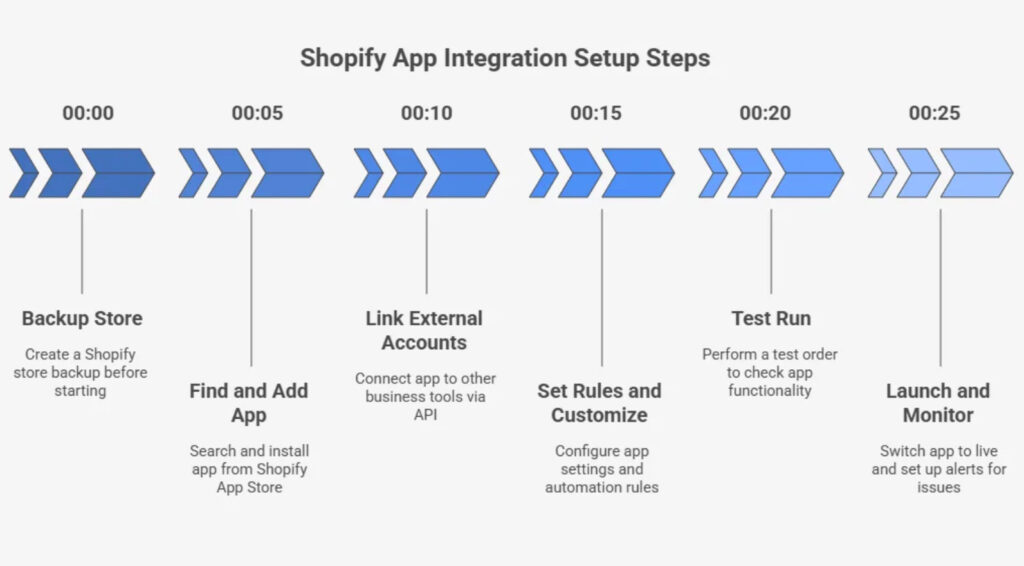
Most take 20-25 min, no tech skills. Back up first.
- Find and Add: Go to Apps > Store, search, pick 4+ stars. Check permissions.
Avoid: Too many slow sites.
- Connect Accounts: Wizard for logins/APIs. Sync quickly.
Avoid: Weak links for extras.
- Set Up Rules: Enable features such as alerts. Check preview.
Avoid: Hidden limits.
- Test It: Fake order, see if it works.
Avoid: Skipping leads to problems.
- Go Live and Watch: Turn on, set alerts. Check weekly.
Avoid: No monitoring lets issues grow.
Keeps taxes accurate, see CRA for online sellers.
Wrapping Up
These apps turn e-commerce chaos into control, cutting errors and sparking 2026 growth from QuickBooks links to ActiveCampaign wins. Focus on what moves the needle.