




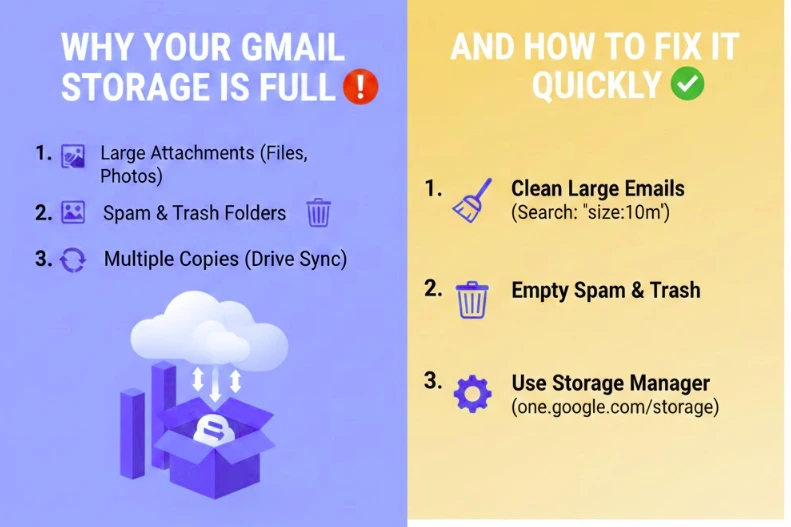
Your Gmail storage is full because Gmail, Google Drive, and Google Photos all share the same storage space. In most cases, email itself is not the main problem. Large attachments, Drive files, and photo backups usually consume far more space than messages.
This is why deleting emails often does not fix the issue, even when the inbox looks empty.
Have questions about this story?Ask Tundra for more details, context, or updates.
Quick Answer: Why Gmail Storage Is Full
| Issue | What It Means | Quick Fix |
| Gmail shows “Storage Full” | Gmail, Drive, and Photos share one storage limit | Check Google account storage breakdown |
| Inbox looks empty | Archived emails and attachments still count | Search and delete large attachments |
| Deleted emails didn’t help | Trash and Spam still use storage | Empty Trash and Spam folders |
| Google Drive is full | Large files or old backups are using space | Sort Drive files by size and delete |
| Google Photos taking space | Photos and videos count toward storage | Remove large videos or unused photos |
| Storage refills quickly | Hidden app or device backups exist | Review and delete old backups |
How Gmail Storage Actually Works (The Part Most People Miss)
Google provides a single storage quota for your entire Google account. That storage is shared across three services:
- Gmail (emails and attachments)
- Google Drive (files, backups, hidden data)
- Google Photos (photos and videos, especially older backups)
When any one of these fills up, Gmail will show a storage full warning and stop receiving new emails.
This shared-storage design is the root cause of most confusion.
The Most Common Reasons Gmail Storage Fills Up
1. Large Email Attachments
Emails with attachments larger than 10 MB take up space quickly, especially older messages that were never cleaned up.
Important detail:
- Attachments still count even if you no longer see the email in your inbox.
- Archived emails still use storage.
2. Google Photos Backups
Photos and videos, especially older uploads and videos, often consume more space than expected.
Common mistake:
- Users assume Photos has unlimited storage.
- Older “high quality” uploads now count toward storage.
3. Google Drive Files You Forgot About
Drive often contains:
- Old PDFs
- Videos
- ZIP files
- App backups
- Shared files that you own
Even files you haven’t opened in years still count.
4. Trash and Spam Still Count (Until Permanently Deleted)
Deleting an email or file does not immediately free space.
Storage is only freed when:
- Trash is emptied
- Spam is cleared
5. Hidden or Automatic Backups
Some apps automatically store backups in Drive without obvious visibility, especially from older Android devices or third-party integrations.
How to Confirm What Is Using Your Storage (1 Minute Check)
Before deleting anything, confirm the cause.
- Open your Google account storage page
- Review the breakdown for:
- Gmail
- Drive
- Photos
This instantly tells you where the space is going.
Most users discover Gmail is the smallest contributor.
Fastest Ways to Free Gmail Storage (In the Right Order)
Step 1: Delete Large Gmail Attachments First
This usually frees space immediately.
How to do it
- Search Gmail for:
has:attachment larger:10M - Sort by oldest
- Delete emails you no longer need
- Empty Trash
Why this works
Large attachments add up quickly and are easy to remove safely.
Step 2: Clear Google Drive Large Files
This often frees more space than email cleanup.
What to look for
- Videos
- ZIP files
- Old backups
- Large PDFs
Sort Drive files by size and remove anything no longer needed.
Step 3: Review Google Photos Storage
Focus on:
- Videos
- Blurry or duplicate photos
- Old screenshots
Deleting a few large videos can free gigabytes instantly.
Step 4: Empty Trash and Spam Everywhere
Do this in:
- Gmail
- Google Drive
- Google Photos
Until Trash is emptied, storage is not released.
Step 5: Check for Hidden Backups
If storage refills quickly:
- Review Drive “Backups”
- Check connected apps
- Remove outdated device backups
Why Deleting Emails Sometimes Doesn’t Work
This frustrates many users, but the reason is simple:
- Gmail emails are usually small
- Attachments matter more than message count
- Drive and Photos often use far more storage
Deleting hundreds of emails without attachments may free almost nothing.
If Gmail Still Shows “Storage Full” After Cleanup
This usually happens because:
- Trash hasn’t been emptied
- Drive or Photos still exceed quota
- Storage display hasn’t refreshed yet
Wait a few minutes, refresh the page, and check the storage breakdown again.
How to Prevent Gmail Storage Problems in the Future
You do not need complex tools. Small habits work.
- Avoid emailing large attachments to yourself
- Use Drive links instead of attachments
- Review Photos videos occasionally
- Delete large Drive files every few months
- Empty Trash regularly
These habits prevent storage from quietly filling again.
When Upgrading Storage Makes Sense
If you:
- Use Gmail heavily for work
- Store many files in Drive
- Back up photos regularly
Then upgrading storage may be reasonable.
But it should be a choice, not a reaction to confusion.
Always clean first. Upgrade only if needed.
Also Read: Why Google Business Reviews Are the Voice of Your Customers?
Final Expert Take
Gmail storage issues are rarely caused by email overload. They are caused by shared storage across Google services, especially Drive and Photos.
Once you understand that system, the fix becomes straightforward:
- Identify the biggest storage user
- Remove large items
- Empty Trash
- Adjust habits going forward
Most users can fix the problem in under 10 minutes.
FAQs
Why is my Gmail storage full even after deleting emails?
Because Gmail shares storage with Google Drive and Google Photos. Deleting emails alone often does not free enough space.
Does Google Drive affect Gmail storage?
Yes. Files stored in Google Drive count toward the same storage quota as Gmail.
Do photos and videos affect Gmail storage?
Yes. Google Photos uses the same shared storage, and videos can consume large amounts quickly.
How fast can I free Gmail storage?
Most users can free space in minutes by deleting large attachments, clearing Drive files, and emptying Trash.
Does emptying Trash really matter?
Yes. Storage is only freed after Trash and Spam are permanently deleted.